NTS Radio: Music Discovery
- 4.4
- Rating
- 100.00K
- Installs
- Free
- Price
 Analysis by App-foxy
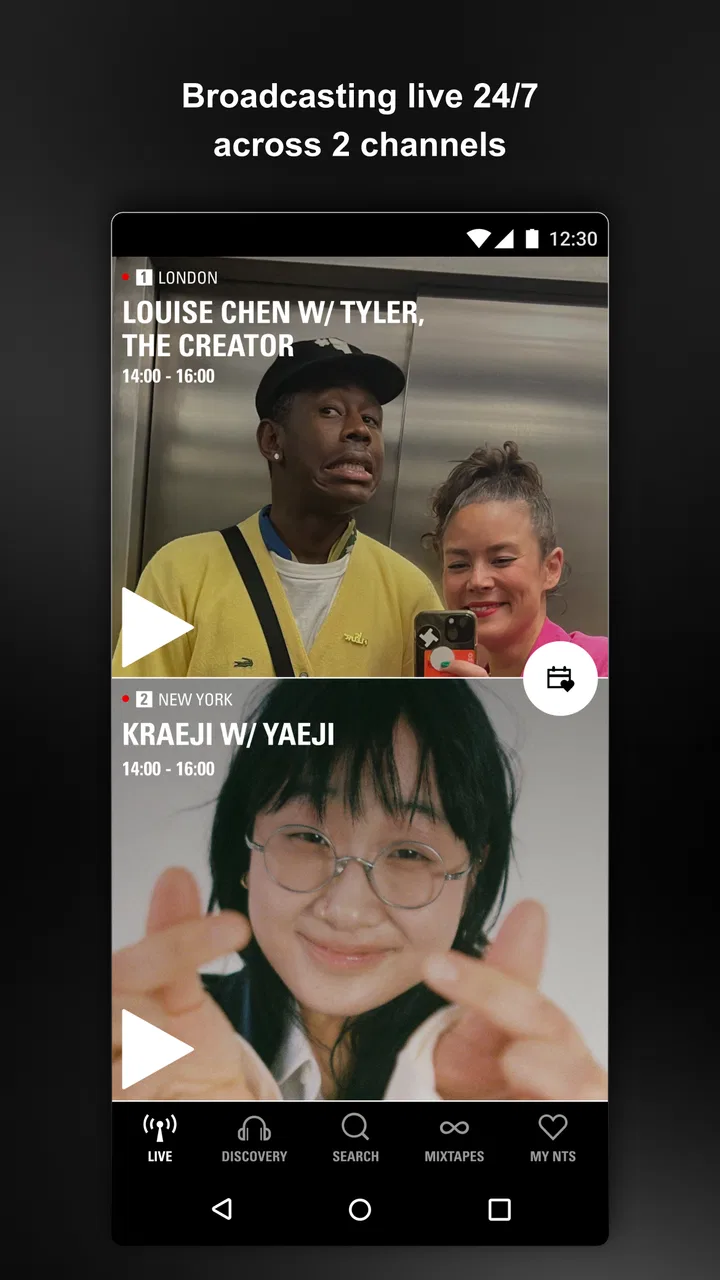
I approached NTS Radio: Music Discovery as a listening app rather than a conventional streaming library. That distinction matters immediately. Instead of beginning with a familiar search box and a neatly predictable collection of albums, it puts the emphasis on radio programming, DJs, artists, and the pleasure of finding something I would not have chosen by myself. In my experience, it feels closer to opening a carefully curated broadcast than assembling a playlist from music I already know.
That makes it an interesting choice in the Music & Audio category, especially for listeners who enjoy specialist selections and want music to accompany a day without constantly making decisions. It is free to download, carries a Teen content rating, and comes from NTS Radio, the developer behind the service. The Android release arrived on June 11, 2019, and the current version is 3.3.3, with support beginning at Android 6.0. The service has passed 100K installs and holds a 4.4 average from around 1.3K ratings, with 91 written reviews. Those figures suggest a healthy audience, but I found the listening experience itself more revealing than the store numbers.
What using NTS Radio feels like
The central appeal is discovery through human choice. A standard music app often asks me to name an artist, choose a mood, or accept an algorithmic mix. NTS Radio takes a different route: I can tune into programming shaped by DJs and artists, then let the sequence unfold. That removes some of the work from listening and replaces it with curiosity. I am not simply retrieving tracks; I am following someone else’s taste for a while.
You May Also Like

 Blood Strike: 2.5 Anniversary
Blood Strike’s Loadouts Turn Every Drop Into a Tactical Gamble
A close look at Blood Strike’s custom loadouts: how fast access to signature weapons reshapes its battle royale rhythm, rewards preparation, and narrows the gap between fights.

 Pandora - Music & Podcasts
Pandora’s Music Is Easy to Start, but Harder to Recover
Pandora’s strength is its low-effort path from a seed to a station. Its weak spot is how much confidence it asks you to place in connection, setup, and quiet recovery.

 8 Ball Pool
 Is Built on Rivalries, Rematches, and Routine
A close look at the rivalries, rematches, shared routines, and unanswered safety questions that turn a quick pool match into a persistent mobile community.

 Samsung Music
’s Quiet Strength Is Playing What You Already Own
Its reach comes less from spectacle than from dependable access to a personal library. That simplicity is both the app’s strongest retention engine and its ceiling.

 AccuWeather: Weather Radar
AccuWeather Review: A Quick, Clear Forecast for Everyday Decisions
For everyday plans, the best forecast is the one you can understand quickly. AccuWeather makes rain timing, radar, and local conditions easy to act on, with a few trade-offs.

 Hill Climb Racing
Why Hill Climb Racing Still Turns Crashes Into One More Run
A tiny car, a bumpy hill and one more upgrade: Hill Climb Racing keeps resurfacing because its simple chaos makes every near-miss feel personal.
More From Our News Desk
View All News


This works particularly well when I want background music that still has character. I can imagine starting a session while making breakfast, commuting, working on a creative project, or cooking dinner. The important difference is that I do not need to prepare a queue first. A broadcast can carry the atmosphere while still introducing unfamiliar sounds, styles, and transitions. For me, that is more engaging than a generic “focus” playlist because the selection has a sense of direction.
The trade-off is control. If I need a specific song immediately, a traditional on-demand service is usually the better tool. NTS Radio is at its strongest when I am willing to accept the journey rather than dictate every stop. That is not a flaw in itself, but it changes the kind of listener who will enjoy it. Someone who wants instant access to a personal library may find the radio-first approach restrictive, while someone tired of repetitive recommendations may find it refreshing.
A practical listening routine
My preferred way to use the app is to treat it as a discovery window. I would start with a short listening session when I have enough attention to notice what is playing, then return later when I only want sound in the room. When a set catches my ear, I can make a mental note of the artist or style and explore it elsewhere if I want a more controlled listening session afterward.
That two-step workflow is more useful than expecting one app to do everything. NTS Radio supplies the unexpected starting point; an ordinary music library can handle repeat listening, personal playlists, and exact track selection. In other words, I see it as a complement to a conventional streaming subscription, not necessarily a replacement for one. Its value rises when I use it to widen my taste rather than measure it against a catalog search.
A realistic everyday example would be a late afternoon when I am finishing routine work and want something more distinctive than the same saved albums. I can open the app, choose a broadcast that fits my mood loosely, and let the programming take over. If the selection becomes too intense or unfamiliar, I can change direction without having wasted time building a playlist. That low-commitment discovery is one of the app’s strongest practical qualities.
Why the human curation matters
Human-led programming changes the listening experience in subtle ways. A DJ can place contrasting tracks next to one another, move between scenes, or create a mood that is not easily described by a single tag. I found that more valuable than endless genre labels because it encouraged me to listen beyond the boundaries of my existing habits.
It also gives the app a stronger identity than a plain collection of automated mixes. The personality comes from the programming itself, not from flashy presentation. For listeners who follow DJs, artists, and independent musical scenes, that sense of context may be more important than having every familiar release in one place.
There is a patience requirement, though. Discovery is not always immediate. A broadcast may take time to settle into a style I enjoy, and not every selection will suit my mood. I would not open this app expecting every minute to be personally tailored. I would open it because the possibility of hearing something outside my routine is part of the point.
Trust, controls, and everyday privacy choices
When I review a listening app, I do not judge trust from its visual style or from broad promises. I look at what the app visibly lets me control, what account steps it asks me to take, and how clearly it presents choices during normal use. With NTS Radio, I would keep that assessment practical: use the app with the access it requests, pay attention to any sign-in or purchase screen, and avoid assuming that a free download means every part of the service is without cost.
The app is listed as free, while in-app purchase items are shown in a range from $3.99 to $214.99 each. That does not automatically make the experience problematic, but it is a reason to slow down before confirming a payment. I would check the wording on any purchase screen and make sure the account’s device-level purchase protections are enabled, particularly if a phone or tablet is shared with family members.
The same cautious approach applies to account controls. If the app presents a choice to sign in, I would decide whether that step is genuinely useful for my listening routine before completing it. If I only want to sample broadcasts, I would avoid creating an account unless the app clearly makes it necessary for the action I want. If I do create one, I would use a password that is not reused elsewhere and review the available account settings rather than treating sign-in as a one-time decision.
I also prefer to make privacy choices at the moment they appear. Permission prompts, consent screens, notifications, and personalization options should be read rather than dismissed automatically. If a notification setting is optional, I would leave it off until I know it adds value. For a radio app, alerts can be useful when they point me toward programming I care about, but they can also become noise. User agency is stronger when I choose the timing and frequency instead of accepting every default.
Data-sensitive moments to handle carefully
Music listening can look harmless, yet several ordinary moments deserve attention. Creating an account, enabling notifications, accepting personalization, and confirming a purchase all involve a different level of commitment than simply pressing play. I would separate those decisions instead of approving everything in one rush.
For example, if I am testing the service for a few minutes, I would not turn on every optional alert just to get started. If I later decide that the programming is part of my routine, I can enable only the notifications that genuinely help. This is a small habit, but it prevents a casual trial from becoming a stream of unwanted interruptions.
I would also keep an eye on the device itself. Android 6.0 is the minimum operating system listed for the current app, so older phones may still be eligible to install it, but performance and system-level permission handling can vary with the device. Before relying on it during travel or a long work session, I would test playback, battery behavior, and notification settings on my own phone rather than assuming that an older handset will behave like a newer one.
That testing is especially sensible for listeners who depend on uninterrupted audio. A radio-focused app is not the right place to discover, at the start of a presentation or journey, that a device setting interferes with playback. A short trial at home can reveal whether the app fits the way I actually use my phone.
Where it beats ordinary alternatives
Compared with a conventional on-demand streaming app, NTS Radio gives me a stronger sense of editorial direction. Search-based services are excellent when I know the artist, album, or track I want. They are also better for building a permanent personal collection. NTS Radio is more compelling when I want a knowledgeable selection to lead me somewhere unexpected.
Compared with a generic internet radio app, its appeal is the apparent focus on DJs and artists rather than simply jumping among broad stations. That makes the experience feel more intentional. I am not choosing only between large genre categories; I am choosing whether to spend time with a particular kind of programming and taste.
There are clear exceptions. If I need offline listening, exact replay control, lyrics, or a carefully ordered workout queue, I would choose a service designed around those tasks. If I dislike hearing music I cannot immediately identify or save, this app may create unnecessary friction. And if I want a completely passive station with familiar hits, a mainstream radio alternative will probably feel easier.
Who should try it, and who should skip it
I would recommend NTS Radio to curious listeners who enjoy specialist music, DJ-led selections, and the feeling of stumbling across a track without searching for it. It is also a good fit for people who want an audio companion during routine tasks but do not want to spend ten minutes assembling the perfect playlist first.
It is less suitable for listeners whose main priority is ownership-like control over playback. If your ideal session means selecting every track, repeating a favorite instantly, and organizing a large personal library, the app’s radio orientation may feel like a compromise. I would also skip it as a primary music tool if mobile data, predictable song choice, or uninterrupted access is more important to you than discovery.
For families, the Teen rating is worth noticing before installation. I would not treat that label as a substitute for personal judgment, especially when different people share a device. Reviewing notification and purchase controls is sensible in that situation, as is making sure that anyone using the phone understands when a screen involves an optional payment or account action.
My final assessment after weighing the trade-offs
NTS Radio succeeds because it does not try to behave like every other music app. Its best feature is the change in mindset it encourages: instead of asking what I already want to hear, it invites me to spend time with a selection shaped by DJs and artists. That makes it particularly valuable for discovery, atmosphere, and breaking out of predictable listening habits.
My caution is equally straightforward. I would not install it expecting a complete replacement for an on-demand library, and I would pay attention to account, notification, and purchase choices rather than moving through them automatically. The free entry point makes experimentation easy, but the presence of in-app purchase items means I would still read each payment screen carefully.
After considering both the listening experience and the user choices around it, I see the app as a strong specialist companion. Its real strength is giving me a reason to listen with curiosity instead of control. If that sounds appealing, the free download is worth trying during an ordinary evening or work session. If you need precise playback and a fully managed collection, keep your usual streaming service and use this one only when you want a more adventurous musical detour.
In short, I would recommend it to a friend who says their playlists have become predictable. I would explain that the reward is not guaranteed familiarity; it is the chance to discover a new direction through radio programming with a clear human presence. That makes NTS Radio distinctive, provided I approach it on its own terms and remain deliberate about the choices that sit outside the music itself.
FAQs for NTS Radio: Music Discovery
01What is NTS Radio: Music Discovery?
NTS Radio is a global music-streaming app focused on discovery rather than conventional hit-radio programming. It offers live broadcasts, specialist shows, guest DJ sets, and carefully selected music from a wide range of genres and cultures. During testing, the app felt especially useful for listeners who enjoy finding unfamiliar artists, underground releases, and eclectic mixes curated by knowledgeable presenters.
02Is NTS Radio free to use?
You can listen to a substantial amount of NTS Radio content without paying, including live stations and many available shows. However, the service also offers a paid membership option called NTS Supporters, which may provide additional benefits such as access to more archived content, exclusive programming, and an ad-free listening experience. Exact benefits can change, so check the current subscription details before signing up.
03Does NTS Radio work on Android and iPhone?
Yes, NTS Radio is available for both Android and iOS devices, making it accessible to most smartphone and tablet users. The app is designed for mobile listening and generally works well over Wi-Fi or cellular data. Before downloading, make sure your device uses a supported operating-system version and has enough free storage for installation and any optional offline content.
04Can I listen to NTS Radio offline?
Offline listening depends on the content and membership features available in the current version of the app. Live radio requires an internet connection, while selected archived programs or mixes may be available for offline playback, particularly for supporters. If you frequently travel or have limited mobile data, review the download controls and subscription terms in the app before relying on NTS Radio without a connection.
05What kind of music can I discover on NTS Radio?
NTS Radio covers an unusually broad selection of music, including electronic, jazz, hip-hop, soul, experimental, classical, ambient, world music, punk, and many regional or specialist scenes. Its programming is intentionally diverse, so it may not suit listeners who want only familiar chart tracks. The best experience comes from exploring different shows, presenters, stations, and archived sessions.
Pros
- Excellent mix of underground music
- global sounds
- and emerging artists.
- Live radio and archived shows offer fresh content throughout the day.
- Curated programming feels more personal than algorithm-based music apps.
- Minimal interface makes browsing stations
- shows
- and episodes straightforward.
- Supports independent artists and distinctive specialist music communities.
Cons
- Some shows may be too niche for listeners seeking mainstream music.
- On-demand availability can vary depending on licensing restrictions.
- Audio quality may depend heavily on your mobile connection.
- The large catalog can make finding specific artists or tracks difficult.
- Some content and features may require an NTS membership or paid access.

NTS Radio: Music Discovery
Gallery